 En
En
 Es
Es
The registration button and language selector cannot be disabled using the platform's standard tools, but they can be hidden by modifying the XML output using plugins.
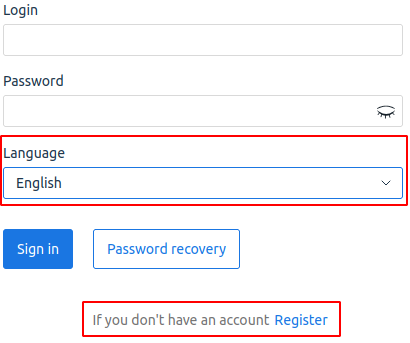
How to hide the registration button
To hide the registration button:
- Connect to the server with the platform via SSH. For more information about connecting via SSH, see Workstation setup.
-
Create the XML plugin file /usr/local/mgr5/etc/xml/billmgr_mod_disable-login-register.xml with the following content:
<?xml version="1.0" encoding="UTF-8"?> <mgrdata> <handler name="disable-login-register-handler" type="xml"> <event name="logon" after="yes"/> </handler> </mgrdata> -
Create the handler script /usr/local/mgr5/addon/disable-login-register-handler with the following content:
#!/bin/bash echo $(cat | sed -Ee 's|register="yes"| register="no"|') - Make the script executable by running the command:
chmod +x /usr/local/mgr5/addon/disable-login-register-handler - Restart the platform using the command:
/usr/local/mgr5/sbin/mgrctl -m billmgr -R
How to hide the language selector
To hide the language selector:
- Connect to the server with the platform via SSH. For more information about connecting via SSH, see Workstation setup.
- Create the XML plugin file /usr/local/mgr5/etc/xml/billmgr_mod_disable-lang.xml with the following content:
<?xml version="1.0" encoding="UTF-8"?> <mgrdata> <handler name="disable-lang-handler" type="xml"> <event name="logon" after="yes"/> </handler> </mgrdata> - Create the handler script /usr/local/mgr5/addon/disable-lang-handler with the following content:
#!/bin/bash echo $(cat | sed -Ee 's|<field name="lang">.*?</field>||') - Make the script executable by running the command:
chmod +x /usr/local/mgr5/addon/disable-lang-handler - Restart the platform using the command:
/usr/local/mgr5/sbin/mgrctl -m billmgr -R
To restore the buttons, delete the added files and restart the platform.
Useful tips
Related topics: