 En
En
 Es
Es
Description
This guide explains how to update the country setting for multiple clients at once using a script. For example, you might need to change the country for a group of clients from India to Bahamas.
How the script works:
-
Validates input parameters:
- verifies that two arguments are provided: the file path and the new country code;
- checks that the specified XLSX file exists;
- confirms the country code is in numeric format;
- ensures the xlsx2csv conversion utility is available.
- Converts the XLSX file to CSV format into a temporary file.
- Processes data line by line:
- Skips the CSV file header.
- Extracts the client ID from the first column.
- Validates the ID: it must not be empty and must be numeric.
- Executes the country update command for each valid ID.
- Generates a console report detailing successful and failed operations.
The script outputs the following information:
- processing progress for each ID;
- operation status (success or error);
- final statistics on the total number of operations.
Prerequisites
For the script to work, you need:
- The xlsx2csv utility.
- An XLSX file with the IDs of clients whose country needs to be changed. The file must contain a single column named account_id;
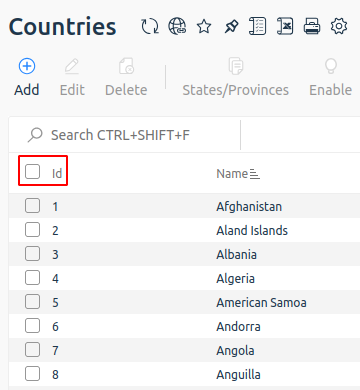
- The country ID from BILLmanager. To check the country ID, go to Directories → Countries → Id column. For example, the Id for Bahamas is 17.
Solution
To update clients' country in bulk:
- Connect to the server with the platform via SSH. For more information about connecting via SSH, see Workstation setup.
- Install the xlsx2csv utility:
Ubuntu, Astra Linuxsudo apt install xlsx2csvAlmaLinuxsudo dnf install xlsx2csv - Create the script file process_ids.sh with the following content:
#!/bin/bash # Script to execute billmgr command for each ID from an XLSX file # Usage: ./script.sh <path_to_xlsx_file> <country_code> # Validate argument count if [ $# -ne 2 ]; then echo "Usage: $0 <path_to_xlsx_file> <country_code>" echo "Example: $0 /path/to/clients.xlsx 17" exit 1 fi FILE_PATH="$1" COUNTRY="$2" # Check if the input file exists if [ ! -f "$FILE_PATH" ]; then echo "Error: File '$FILE_PATH' not found" exit 1 fi # Validate the country code format if ! [[ "$COUNTRY" =~ ^[0-9]+$ ]]; then echo "Error: Country code must be a numeric value" exit 1 fi # Check for the required conversion utility if ! command -v xlsx2csv &> /dev/null; then echo "Error: The 'xlsx2csv' utility is required but not installed" echo "Install it using your package manager or via pip: pip install xlsx2csv" exit 1 fi # Create a temporary file for CSV data convert_xlsx_to_csv() { local xlsx_file="$1" if command -v xlsx2csv &> /dev/null; then xlsx2csv "$xlsx_file" else echo "Error: Utility for converting XLSX to CSV not found" exit 1 fi } # Create a temporary file for CSV data TEMP_CSV=$(mktemp) echo "Converting XLSX file to CSV format..." convert_xlsx_to_csv "$FILE_PATH" > "$TEMP_CSV" # Verify the conversion was successful if [ $? -ne 0 ] || [ ! -s "$TEMP_CSV" ]; then echo "Error: Failed to convert the XLSX file" rm -f "$TEMP_CSV" exit 1 fi echo "Processing client IDs from the file..." echo "Target Country Code: $NEW_COUNTRY_CODE" echo "---" # Initialize counters SUCCESS_COUNT=0 ERROR_COUNT=0 # Process the CSV file { # Skip the header row read -r header while IFS=, read -r id other_columns; do # Clean up the ID value id=$(echo "$id" | sed 's/^"//; s/"$//; s/^[[:space:]]*//; s/[[:space:]]*$//') # Check that the ID is not empty and is numeric if [ -n "$id" ] && [[ "$id" =~ ^[0-9]+$ ]]; then echo "Processing ID: $id" # Execute the command if /usr/local/mgr5/sbin/mgrctl -m billmgr account.edit "elid=$id" "country=$COUNTRY" sok=ok; then echo "✓ Successfully processed ID: $id" ((SUCCESS_COUNT++)) else echo "✗ Error processing ID: $id" ((ERROR_COUNT++)) fi echo "---" else echo "Skipping invalid row: $id" fi done } < "$TEMP_CSV" # Remove the temporary file rm -f "$TEMP_CSV" echo "Processing completed:" echo "Successful: $SUCCESS_COUNT" echo "Errors: $ERROR_COUNT" - Make the script executable:
chmod +x process_ids.sh - Run the script, specifying your file and the target country code:
./process_ids.sh /your/file.xlsx 17Comments - Restart the platform:
sudo /usr/local/mgr5/sbin/mgrctl -m billmgr -R - Verify the update by checking a client's profile:
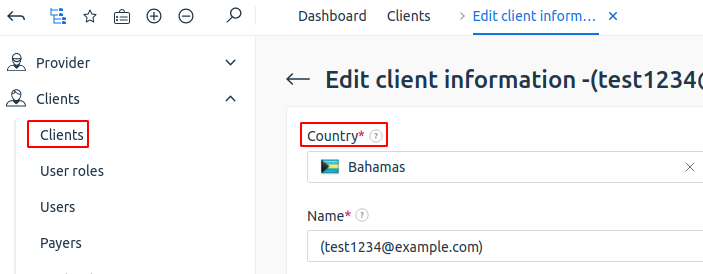
- Navigate to Clients → Clients.
- Select a client.
- Click Edit.
- Check the Country field.
Useful tips
Related topics: