 En
En
 Es
Es
Problem
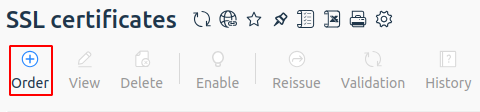
SSL certificate ordering does not work. When you click the Order button in Products/Services → SSL certificates, the selection and ordering form does not open. Clicking the Order button does not open the order form. There are no errors in the web interface or logs.
Cause
Starting with BILLmanager version 6.144, the SSL certificate ordering mechanism was updated. If the configuration file contains the Option OldOrder option, the new mechanism does not start, and the old one is no longer supported.
Diagnostics
To confirm the cause of the issue:
- Connect to the server with the platform over SSH. For more information about connecting over SSH, see the article Workstation setup.
- Check whether the
Option OldOrderoption exists in the configuration file:cat /usr/local/mgr5/etc/billmgr.conf | grep "Option OldOrder"Example of the option being presentOption OldOrderIf the option is found, this confirms the cause.
Solution
To solve the issue, disable the Option OldOrder option in the configuration file:
- Connect to the server with the platform over SSH. For more information about connecting over SSH, see the article Workstation setup.
- Open the configuration file /usr/local/mgr5/etc/billmgr.conf in any editor.
- Find the line with the
Option OldOrderoption and comment it out by adding the#symbol at the beginning of the line:
# Option OldOrder - Save the changes and close the editor.
- Restart BILLmanager:
sudo /usr/local/mgr5/sbin/mgrctl -m billmgr -R - Check whether SSL certificate ordering is available.
Useful tips
Related topics: