 En
En
 Es
Es
This is the documentation for the deprecated product BILLmanager 5. It is no longer updated and may be irrelevant. Documentation for the current version of BILLmanager can be found in the BILLmanager 6 section.
| Payment methods support | ||||
|---|---|---|---|---|
| Bank cards | Cash | E-wallets | Mobile payments | Online banking |
 |  | | | |
| Mastercard, Union Pay, Visa, Mir. | QIWI Wallet, WebMoney, YooMoney. | Yota, Beeline, Megafon, MTS, Tele2. | Alpha-Click. | |
| Supported features | ||||
| Payments return | | |||
| Recurring payments | | |||
| Subscriptions | | |||
Configuring BILLmanager
Navigate to Provider → Payment method and complete the following fields:
- Step 1 — select the payment method "Platbox".
- Step 2 — Integration settings. Enter the integration details.
- Step 3 — Payment method settings. Enter the payment method parameters.
Integration
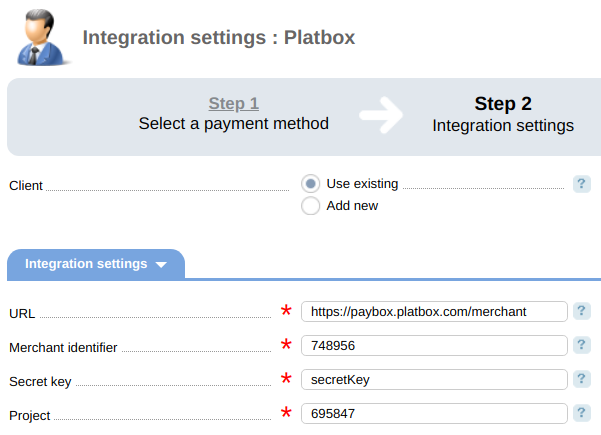
Enter the following configuration details if you want to use your existing account:
- URL — URL of the payment gateway. Test demo: https://playground.platbox.com/merchant, production URL: https://paybox.platbox.com/merchant
- Merchant id — merchant id in Platbox
- Secret key — secret key in Platbox
- Project — product identifier
Select the option Add new to get registered in Platbox.
Information for tests
Use the following information for test payments:
Additional information
Refunds
Refunds are not supported.
Logging
Platbox has three log-files:
- '/usr/local/mgr5/var/pmplatbox.log' — configuration details of the payment method.
- '/usr/local/mgr5/var/plpayment.log' — payments.
- '/usr/local/mgr5/var/pbresult.log' — responses from the payment gateway.