 En
En
 Es
Es
This is the documentation for the deprecated product BILLmanager 5. It is no longer updated and may be irrelevant. Documentation for the current version of BILLmanager can be found in the BILLmanager 6 section.
You can transfer payments between personal accounts of the same or different clients.
The payment must meet the following criteria in order to be transferred:
- the payment is in the "Paid" status;
- there should be no partial or full refund on the payment;
- there should be no certificates of work performed issued regarding the payment or expenses settled by the payment;
- there should be no receipts for expenses settled by payment;
- the personal account to which the payment is transferred cannot be the same as the current account.
To transfer a payment, enter Tools → Payments transfer. The payment transfer procedure is performed in several steps:
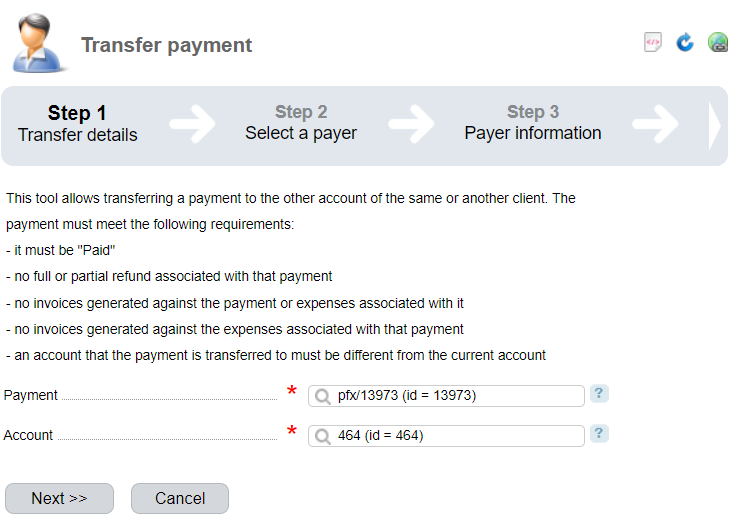
- Fill in the details for the transfer:
- Payment — enter the payment id number. The payment will have the name in the form 'pfx/<number>';
- Personal account — enter the number of the personal account to which the payment is transferred.
- Press Next.
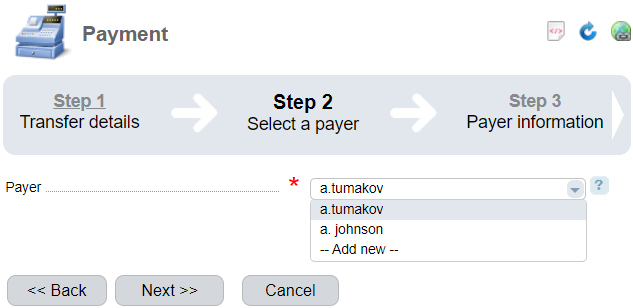
- Select an existing Payer or create a new one. Read more in Payers.
- Press Next.
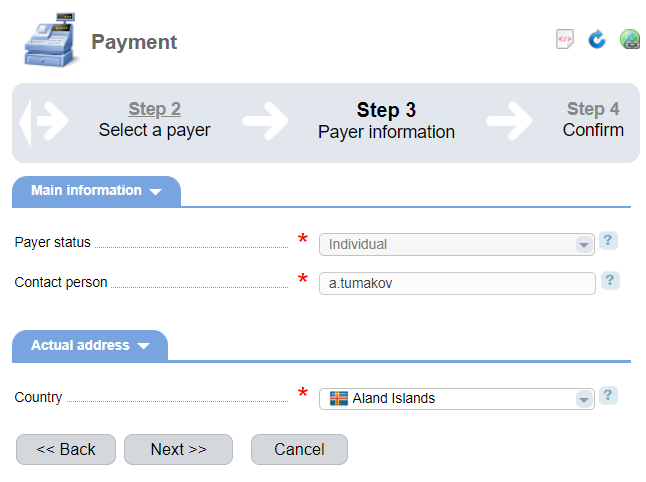
- Specify the payer's details:
- contact person;
- country of physical presence of the payer;
- Press Next.
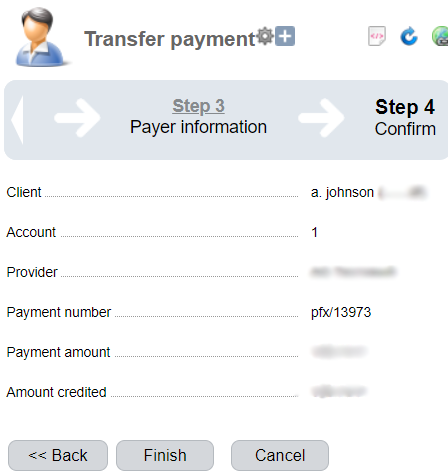
- Read the payment transfer notice.
- Press Finish.