 En
En
 Es
Es
This is the documentation for the deprecated product BILLmanager 5. It is no longer updated and may be irrelevant. Documentation for the current version of BILLmanager can be found in the BILLmanager 6 section.
Product types have add-ons. An add-on is a template for additional services of a tariff plan. An add-on has an internal name and settings. A resource inherits these settings from the add-on. For more information please refer to the article Tariff plan configuration.
We do not recommend that you edit the internal names of pre-made add-ons.
Use a manual processing module or activation via Shell-scripts for custom add-ons. For more information please refer to the article Integration via ShellScripts.
Configuring product type details
Navigate to Products → Product types → Details → Add:
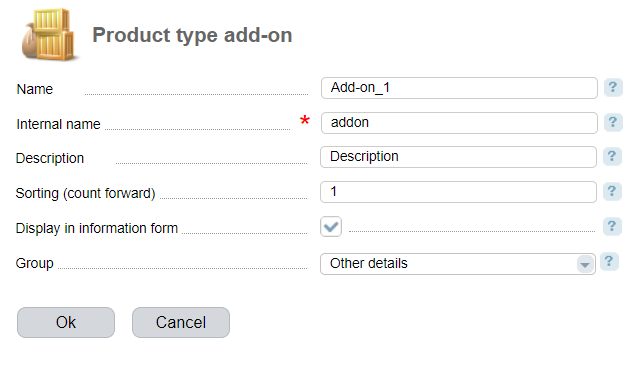
- Name — enter a name that will be displayed in the Type field on the add-on configuration form in Products → Tariff plans → Details → Edit;
-
Internal name — enter a unique internal name that allows identifying a product type detail in the list of processing modules;
Note:The internal name of the add-on must not match the built-in internal names. Verify this using the API request:
API request<BILLmanager address>? billmgr? func = <internal product type name> & out = xmlExplanationsIf a verifiable internal name is found in the response to the request, use a different name.
- Description — add-on description that will be displayed on the service order form for clients in BILLmanager 6;
- Sorting — set priority to show this parameter on a service order or edit form;
- Upload icon — it is displayed on a service order form if a specific icon is not used;
- Display on information form — select the checkbox o display detailed information about the service on the client side in BILLmanager 6;
- Group — this group is used on a detailed information page on the client side in BILLmanager 6.