 En
En
 Es
Es
This is the documentation for the deprecated product BILLmanager 5. It is no longer updated and may be irrelevant. Documentation for the current version of BILLmanager can be found in the BILLmanager 6 section.
Dynamic Host Configuration Protocol (DHCP) automatically assigns IP addresses to virtual machines connected to the organization network. To manage a DHCP-server, navigate to Products/Services → Virtual DC → Routers → DHCP → Add:
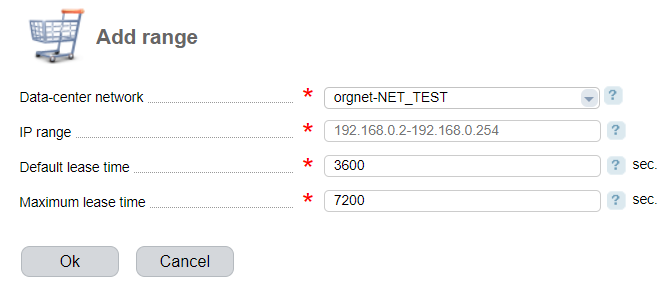
Enter the following parameters:
- Data-center network — enter a network;
- IP range — select a range of IP addresses that will be allocated to virtual machines. You can enter a single IP address or a range;
- Default lease time — enter the default period for the IP address;
- Maximum lease time — enter the maximum lease period for the IP address.
Configuration rules
- the range cannot contain more than 65535 IP addresses;
- the IP range of the DHCP-server cannot exceed the IP pool of the VDC network.
IP range modification rules
- when expanding the range, you cannot add a SNAT rule translated IP address, which was not included into the range;
- when decreasing the range, you cannot exclude a SNAT rule translated IP address, which was included into the range;
- when expanding the range, you cannot add a DNAT rule source IP address, which was not included into the range;
- when decreasing the range, you cannot exclude a DNAT rule source IP address, which was included into the range;
- when expanding the range, you cannot add load balancing server IP addresses, which was not included into the range;
- when decreasing the range, you cannot exclude a load balancing server IP address, which was included into the range;
- when decreasing the range, you cannot exclude IP addresses of virtual servers which were included into the range;