En
En
 Es
Es
This is the documentation for the deprecated product BILLmanager 5. It is no longer updated and may be irrelevant. Documentation for the current version of BILLmanager can be found in the BILLmanager 6 section.
You can integrate BILLmanager with a product that manages the domain zone of a service provider. This allows assigning domain names of the third-level to service IP addresses. If the integration is set up BILLmanager creates an A record of the subdomain in the provider domain zone. The system can be integrated with DNSmanager or ISPmanager.
Note:
Provider's domain where third-level subdomains will be created for customers must be delegated to the name servers on the server managed by DNSmanager or ISPmanager.
To integrate BILLmanager with a name server management panel:
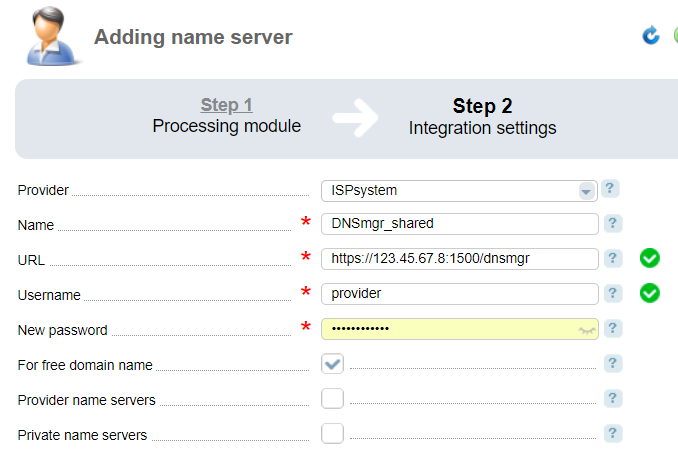
- Navigate to Integration → Name server → Add.
- Select a control panel: DNSmanager 5, ISPmanager 5 or ISPmanager 4.
- Enter the URL, login, and password to access the control panel.
- Provider — select a provider that can use the name server. This field is available only in BILLmanager Corporate.
- Name — enter any name for this integration.
- URL — enter the URL of the control panel. Make sure it is accessible from the server with BILLmanager.
- Username — enter the username of the account in the control panel with "User" role permissions (neither "Reseller" nor "Administrator"). The domain zone for free third-level domains must belong to this user.
- Password — enter the user password.
- For free domain name — select the checkbox to allow creating a free domain name.
- Provider name server, Private name server — select the checkbox to use either provider or private name servers .