 En
En
 Es
Es
This is the documentation for the deprecated product BILLmanager 5. It is no longer updated and may be irrelevant. Documentation for the current version of BILLmanager can be found in the BILLmanager 6 section.
The Advertising tool allows you to create banners with promotions and offers for a given client segment. The banner is displayed on the main page of the client interface in the "Promotions, special offers, news" section.
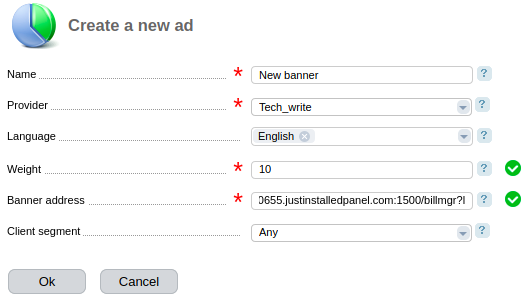
To create a banner:
- Enter Marketing → Banner ads → Add.
- Specify the Name of the ad.
- Select the Provider for whose clients the banner will be displayed.
- Specify one or more Languages. Ads will be displayed only to clients with the selected language. If no language is selected, the ads will be shown to all clients.
- Specify the Weight as an integer number. It affects how often the banner is displayed.
- Enter the Banner address – the URL from which the banner will be downloaded to be displayed to clients.
- Specify the Client segment for which this ad will be displayed. Read more about client segments in Client segments.
- Press Ok.
You can create any number of banners, but BILLmanager shows only one banner at a time. You can also enable or disable ads as needed.