You can add equipment to the platform by importing a CSV file. This feature can be useful for:
adding a large number of devices at once; migrating from a similar platform to DCImanager 6. Preparing the CSV File The CSV file must not exceed 16 MB. Otherwise, the operation will fail with an error, and the equipment will not be imported.
The CSV file must have the following structure:
#type_1
field_1,field_2,field_3,field_4
field_1,field_2,field_3,field_4

#type_2
field_1,field_2,field_3,field_4
field_1,field_2,field_3,field_4
...
type_1 and type_2 — the type of equipment or record to be added. DCImanager 6 supports the following equipment and record types:
rack — rack; server platform — platform; switch platform — switch_platform; chassis platform — chassis_platform; chassis platform slot specification — chassis_slot_specification; chassis — chassis; server — server; BMC — ipmi or bmc; Intel AMT — intel_amt; switch — switch; PDU — pdu; uninterruptible power supply — ups; user — user; server IP address — server_ip. Skipping Parameters You can omit some parameters. To do this, leave the corresponding field empty:
Example with skipped field "field_2"
#type
field_1,,field_3,field_4
If empty parameters are at the end of the line, do not add commas after the last parameter:
Example with skipped fields "field_3" and "field_4"
#type
field_1,field_2
Adding Equipment Racks Rack row syntax
name,size,noteRequired fields:
Field
Field Description
rack name size
number of units
Optional fields:
Field
Field Description note
note
Server platform row syntax
name,type,server_size,is_short_depth,cpu_socket_count,ram_slot_count,max_ram,hdd_slot_count,pci_slot_count,cpu_socket_name
Required fields:
Field
Field Description Notes name
platform name type
platform type can only take two values:
server — rack-mounted server;blade — blade serverserver_size
size of the server platform in:
units — for a rack-mount server platorm slots — for a blade server platform is_short_depth
whether the platform occupies only part of the rack depth can only take two values:true — platform occupies half the rack depth;false — platform fully occupies the rack depth leave empty for blade server
Optional fields:
Field
Field Description cpu_socket_count
number of CPU sockets ram_slot_count
number of RAM slots max_ram
maximum RAM capacity hdd_slot_count
number of HDD slots pci_slot_count
number of PCI slots cpu_socket_name
CPU socket name
Switch platform row syntax
name,size,port_count,type,is_short_depthRequired fields:
Field
Field Description Notes name
platform name size
size of the server platform in:
units — for a rack-mount server platorm slots — for a blade server platform port_count
ethernet ports count
type
platform type can only take two values:
rack-mount — rack-mount switch;blade — blade server switch
Optional fields:
Field
Field Description Notes is_short_depth
whether the platform occupies only part of the rack depth can only take two values:true — platform occupies half the rack depth;false — platform fully occupies the rack depth leave empty for blade switch platform
Chassis platform row syntax
name,size,is_short_depth,psu_count,fan_countRequired fields:
Field
Field Description Notes name
platform name size
size of the server platform in:
units — for a rack-mount server platorm slots — for a blade server platform
is_short_depth
whether the platform occupies only part of the rack depth can only take two values:
true — platform occupies half the rack depth;false — platform fully occupies the rack depth
Optional fields:
Field
Field Description Notes psu_count
power supply units count fan_count
fan count
Chassis slot platform slot row syntax
chassis_platform,side,ordinal_number,blade_server_support,blade_switch_supportEvery entry describes one slot of the platform.
Required fields:
Field
Field Description Notes chassis_platformимя платформы шасси
side
slot side
ordinal_number
ordinal number of the slot
integer, unique for the platform; we recommend that you place them in the order blade_server_support
does the slot support blade servers insertion
blade_switch_support
does the slot support blade switches insertion
Chassis Blade server chassis row syntax
name,platform,rack,unit,side,noteRequired fields:
Field
Field Description Notes name
chassis name platform
chassis platform name rack
name of the rack where the chassis is installed unit
identifier of the rack unit where the device is installed side
side of the rack unit
can only take two values:front — platform is installed in the front part of the rackrear — platform is installed in the rear part of the rack required only if
is_short_depth of the chassis platform is true
Optional fields:
Field
Field Description note
note
Servers Server row syntax
name,platform,rack,unit,side,chassis,slot,configuration,mac,owner,installed_os,noteRequired fields:
Field
Field Description Notes name
server name platform
server platform name rack
rack name leave empty for blade server unit
rack unit identifier leave empty for blade server side
side of the rack unit
can only take two values:front — platform is installed in the front part of the rackrear — platform is installed in the rear part of the rack leave empty for blade server chassis
chassis name if this is not a blade server, leave empty slot
chassis slot number if this is not a blade server, leave empty
Optional fields:
Field
Field Description configuration
server configuration mac
server MAC address owner
server owner name installed_os
name of the OS installed on the server note
note
BMC BMC row syntax
address,user,password,type,server,web_urlRequired fields:
Field
Field Description Notes addressBMC IP address
userBMC administrator username passwordAdministrator password typeBMC protocol and protocol version possible values:
lan — IPMI v1.5 lanplus — IPMI v2.0 redfish — Redfish v1 serverName of the server associated with the BMC
Optional fields:
Field
Field Description web_url
BMC URL address , used when opening via the proxying module
Switches The syntax and required fields for switches depend on the protocol used:
Switch row syntax with SNMP protocol
proto,name,platform_name,device,ip,rack,unit,side,chassis,slot,note,snmp_version,snmp_community,snmp_auth_username,snmp_auth_password,snmp_auth_level,snmp_auth_proto,snmp_privacy_protocol,snmp_privacy_password
Switch row syntax with NetConf protocol
proto,name,platform_name,device,ip,rack,unit,side,chassis,slot,note,netconf_username,netconf_password,netconf_portSwitch row syntax with NX-API protocol
proto,name,platform_name,device,ip,rack,unit,side,chassis,slot,note,nxapi_username,nxapi_password,nxapi_port,nxapi_protocolSwitch row syntax with eAPI protocol
proto,name,platform_name,device,ip,rack,unit,side,chassis,slot,note,eapi_username,eapi_passwordSwitch row syntax with RouterOS API protocol
proto,name,platform_name,device,ip,rack,unit,side,chassis,slot,note,mikrotik_username,mikrotik_password,mikrotik_port,mikrotik_sslFields required for all types of switches:
Field
Field Description Notes protoswitch connection protocol possible values:
snmpnetconfnxapieapimikrotiknameswitch name platform_namename of the switch platform deviceinternal name of the switch handler the parameter must contain only one name :
zyxel_xgs_oldcisco_snmpsnmp_commonjuniper_with_elscisco_nexus_nxapiarista_eapimikrotik_apiipswitch IP address servername of the server associated with the BMC rack
name of the rack where the switch is installed unit
identifier of the rack unit where the device is installed side
side of the rack unit
can only take two values:front — device is installed in the front part of the rack;rear — device is installed in the rear part of the rack; required only if is_short_depth of the switch platform is true chassis
chassis name
leave empty for rack-mount switches slot
list of chassis slot numbers that the switch takes, divided by semicolons
for example: 3;4 leave empty for rack-mount switches
Fields required only for switches with SNMP v1/v2/v3 protocol:
Field
Field Description Notes snmp_communitycommunity name
snmp_versionSNMP protocol version possible values:
Fields required only for switches with SNMP v3 communication protocol:
Field
Field Description Notes snmp_auth_usernameusername for SNMP access
snmp_auth_passwordauthentication protocol passphrase snmp_auth_levelauthentication level possible values:
1 — no_auth_or_privacy2 — auth_without_privacy3 — auth_with_privacysnmp_auth_protoauthentication protocol possible values:
snmp_privacy_protocolsecurity protocol possible values:
snmp_privacy_password
security protocol passphrase
Fields required only for switches with NetConf communication protocol: :
Field
Field Description netconf_username
username for NetConf protocol
netconf_password
password for NetConf protocol netconf_portport for NetConf protocol
Fields required only for switches with NX-API communication protocol: :
Field
Field Description Notes nxapi_username
username for NX-API protocol
nxapi_password
password for NX-API protocol nxapi_portport for NX-API protocol nxapi_protocolprotocol type possible values:
Fields required only for switches with eAPI communication protocol: :
Field
Field Description Notes eapi_usernameusername for eAPI protocol
eapi_passwordpassword for eAPI protocol
Fields required only for switches with RouterOS API communication protocol:
Field
Field Description Notes mikrotik_usernameusername for RouterOS API protocol
mikrotik_passwordpassword for RouterOS API protocol mikrotik_portport for RouterOS API protocol mikrotik_sslSSL value for RouterOS API protocol can only have two values:
true — use SSLfalse — do not use SSL
Optional fields:
Field
Field Description note
note
PDU PDU row syntax
name,device,ip,rack,unit,size,is_short_depth,side,note,snmp_version,snmp_community,snmp_auth_username,snmp_auth_password,snmp_auth_level,snmp_auth_proto,snmp_privacy_protocol,snmp_privacy_passwordRequired fields:
Field
Field Description Notes namePDU name
devicePDU handler name :
apcatenats c3_solutionsrpcmipPDU IP address rack
rack name where the device is installedunit
identifier of the rack unit where the device is installed size
device size in units is_short_depth
whether the device occupies only part of the rack depth
can only take two values:
true — device occupies half the rack depthfalse — device fully occupies the rack depthside
side of the rack unit
can only take two values:front — device is installed in the front part of the rackrear — device is installed in the rear part of the rack required only if
is_short_depth
has the value true snmp_community
Community name
Fields required only for devices with SNMP communication protocol: v3:
Field
Field Description Notes snmp_auth_usernameusername for SNMP access
snmp_auth_passwordauthentication protocol passphrase snmp_auth_levelauthentication level possible values:
1 — no_auth_or_privacy2 — auth_without_privacy3 — auth_with_privacysnmp_auth_protoauthentication protocol possible values:
snmp_privacy_protocolsecurity protocol possible values:
Optional fields:
Field
Field Description Notes note
note
snmp_version
version of the SNMP protocol
default is 2
UPS UPS row syntax
name,device,ip,rack,unit,size,is_short_depth,side,note,snmp_version,snmp_community,snmp_auth_username,snmp_auth_password,snmp_auth_level,snmp_auth_proto,snmp_privacy_protocol,snmp_privacy_passwordRequired fields:
Field
Field Description Notes nameUPS name
deviceUPS handler name handler options:
emerson_liebertkeor_mod_250apcipUPS IP address rack
rack name where the device is installedunit
identifier of the rack unit where the device is installed size
device size in units is_short_depth
whether the device occupies only part of the rack depth
can only take two values:
true — device occupies half the rack depthfalse — device fully occupies the rack depthside
side of the rack unit
can only take two values:front — device is installed in the front part of the rackrear — device is installed in the rear part of the rack required only if
is_short_depth
has the value true
Fields required only for devices with SNMP communication protocol: v1/v2/v3:
Field
Field Description snmp_communitycommunity name snmp_versionSNMP protocol version
Fields required only for devices with SNMP communication protocol: v3:
Field
Field Description Notes snmp_auth_usernameusername for SNMP access
snmp_auth_passwordauthentication protocol passphrase snmp_auth_levelauthentication level possible values:
1 — no_auth_or_privacy2 — auth_without_privacy3 — auth_with_privacysnmp_auth_protoauthentication protocol possible values:
snmp_privacy_protocolsecurity protocol possible values:
Optional fields:
Field
Field Description note
note
Server IP Addresses Server IP address row syntax
ip,domain,server,is_mainRequired fields:
Field
Field Description ip
server IP address domainIP address domain servername of the server to which the IP address will be added
Optional fields:
Field
Field Description Notes is_main
whether the IP address is the main one for the server can only take two values:
true — IP address is the main onefalse (default) — IP address is not the main one
Users Rack row syntax
name,password,levelRequired fields:
Field
Field Description Notes name
username passworduser password levelaccess level possible options:
admin — administratoruser — user
Custom field UPS row syntax
entity_type,field_name,field_type,readable_names,is_required,priorityRequired fields:
Field
Field Description Notes entity_typeequipment type for which the field will be created possible values:
rack; server; switch; pdu; ups; chassis; dss_chassis; dss_chassis_controller; dss_cache_module; cpu; ram; storage; pci; psu; other_spare_part field_nameinternal name of the field Latin characters, numbers, and underscores
field_typefield type possible values:
string; text; select; date; numeric; bool; url readable_names
field name to be displayed in the user interface string separated by the `;` character:
first value — readable_name_default (default value if translation is not found) second value — readable_name_ru third value — readable_name_en fourth value — readable_name_es
Optional fields:
Field
Field Description Notes is_required
sets if is the field required
priority
field display priority
can be 1 or more blank equals to 1
Custom field value UPS row syntax
entity_type,entity_name,field_name1:field_value1,...,field_nameN:field_valueNRequired fields:
Field
Field Description Notes entity_typeentity type for which the field value will be assigned possible values:
rack; server; switch; pdu; ups; chassis; dss_chassis; dss_chassis_controller; dss_cache_module; cpu; ram; storage; pci; psu; other_spare_part entity_namename of the device with the field
Example CSV File #rack
csv_rack,90
csv_rack_2,40,small rack
#platform
csv_platform,server,0.5,true
csv_platform2,server,1,false,2,2,4096,2,2,LGA1700
csv_blade_platform,blade,1.5
#chassis
csv_chassis,0.5,10,csv_rack,39.5,true,front
csv_chassis_2,1.5,2,csv_rack,38,false,,my new chassis\
#user
csvuser@example.com,password,admin
csvuser2@example.com,RuRuRuRu,user
#server
csv_server_1,csv_platform,csv_rack,30,front,,
csv_server_2,csv_blade_platform,,,,csv_chassis,1
csv_server_3,csv_blade_platform,,,,csv_chassis_2,2,,,csvuser@example.com
csv_server_4,csv_platform,csv_rack,15,front,,,configuration,AA:AA:AA:AA:AA:BC
csv_server_5,csv_platform,csv_rack,16,front,,
#bmc
1.2.3.4,ADMIN,password,redfish,csv_server_1
4.3.2.1,NoADMIN,no password,lanplus,csv_server_2,https://www.google.com
#server_ip
10.99.0.77,csv.domain,csv_server_1,true
10.99.0.78,csv.domain,csv_server_1
10.99.0.79,csv.domain,csv_server_1
2001:db8:abcd:1234::2,csv.domain,csv_server_1
#ups
csv_ups_1,emerson_liebert_nx,2.2.2.2,csv_rack,27,1,false,,some note,2,community
csv_ups_2,keor_mod_250,2.2.2.3,csv_rack,28,1,false,,some note,2,community
csv_ups_3,apc,2.2.2.4,csv_rack,25,1,false,,,1,community
csv_ups_4,apc,2.2.2.5,csv_rack,26,1,false,,,3,community,username,password,3,sha,aes,private_key
#pdu
csv_pdu_1,apc,2.2.1.4,csv_rack,29,0.5,false,,,2,community
csv_pdu_2,raritan,2.2.1.5,csv_rack,29.5,0.5,false,,,2,community
csv_pdu_3,rpcm,2.2.1.6,csv_rack,22,0.5,false,,pdu note,1,community
csv_pdu_4,c3_solutions,2.2.1.7,csv_rack,22.5,0.5,false,,pdu note,3,community,username,password,3,sha,aes,private_key
#switch
snmp,csv_switch_1,zyxel_xgs_old,1.2.2.4,csv_rack,23,0.5,true,front,,2,community
snmp,csv_switch_2,cisco_snmp,1.2.2.5,csv_rack,23.5,0.5,true,rear,switch note,1,community
snmp,csv_switch_3,snmp_common,1.2.2.6,csv_rack,21,1,false,,,3,community,username,password,3,sha,aes,private_key
netconf,csv_switch_4,juniper_with_els,1.2.2.7,csv_rack,20,1,false,,,netconf_user,netconf_password,555
nxapi,csv_switch_5,cisco_nexus_nxapi,1.2.2.8,csv_rack,19,1,false,,,nxapi_username,nxapi_password,777,https
eapi,csv_switch_6,arista_eapi,1.2.2.9,csv_rack,18,1,false,,,eapi_username,eapi_password
mikrotik,csv_switch_7,mikrotik_api,1.2.2.10,csv_rack,17,1,false,,,mikrotik_username,mikrotik_password,777,true
#custom_field
server,warehouse_number,numeric,Warehouse number;Складской номер;Warehouse number;Número de almacén,true,1
rack,private_state,select,Private state;Внутреннее состояние;Private state;Estado privado
#custom_value
server,some_server_name,warehouse_number:675,some_field2:new_value
server,some_server_name_2,warehouse_number:555
rack,1,private_state:closed
rack,2,private_state:vanishedImporting Equipment The equipment import operation is irreversible. Before importing, be sure to back up the platform. For more information on backup, see the article
Creating platform backups .
To import equipment from a CSV file:
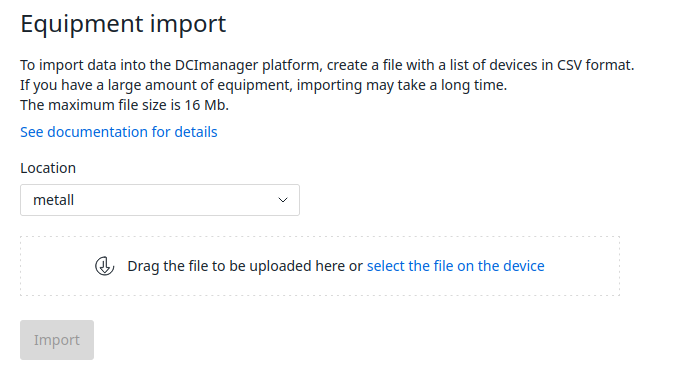
Go to Settings → Equipment import . Specify the Location to which the equipment will be added. Select the file to upload. Click Import . Interface of the Equipment import window Upon completion of the operation, you will receive a notification in the platform interface.
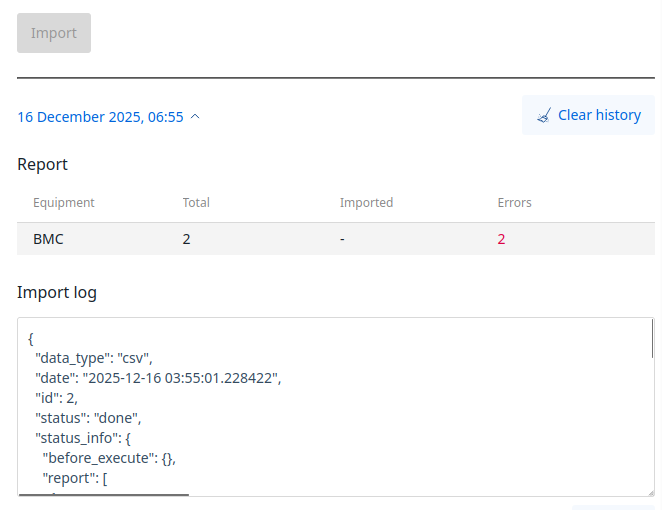
Diagnostics After performing at least one operation, you can view its execution logs in the Equipment import window.
Interface of the Equipment import window with operation logs expanded
 En
En
 Es
Es