 En
En
 Es
Es
IP pools group ranges of IP addresses. They can be designated as public and private IP addresses.
For operations with pools, enter Network → IP pools.
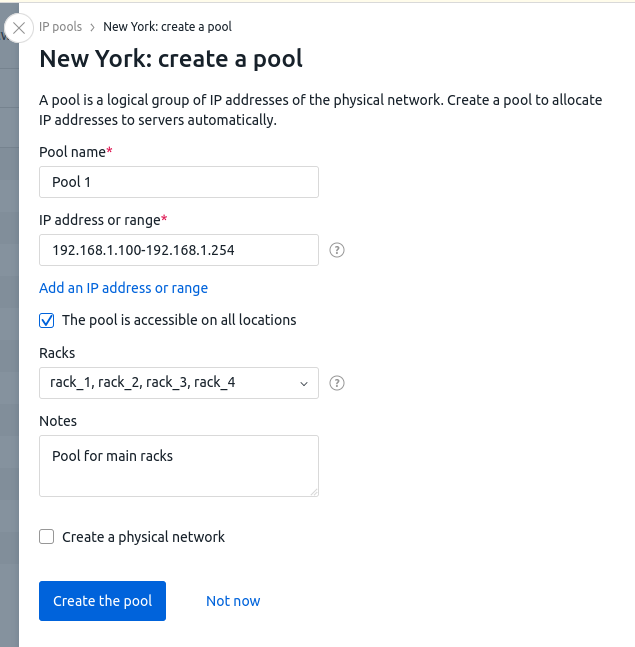
To create an IP pool:
- Press Create a pool.
- Enter a Pool name.
- Specify the IP range of the pool. You can enter a single IP address ("1.1.1.1"), a mask ("1.1.1.1/24") or a range ("1.1.1.1-1.1.1.5").
- Enable The pool is accessible on all locations option to allow DCImanager 6 to use IP addresses from this pool in all locations.
- To assign addresses from the pool to servers in specific racks, select Racks.
- Enter Notes, if needed. They will be displayed in the list of IP pools.
- To create a physical network that the range for the pool is allocated from:
- Enable the option Create a physical network.
- Enter a Network in the following format <network IP address>/<network mask prefix>. E.g. "172.0.0.0/24" or "2001:0db8:85a3:0001::/64".
You cannot create IPv6 newtork with prefix longer than /64. - Enter a Gateway.
- If the network will be used at all locations, enable the option The network is accessible on all locations.
-
If needed, specify the network information:
- VLAN id;
- DNS servers;
- NTP servers.
These field are for information only. They do not affect network in any way. - Enter Note, if needed.
- Click on Create.
You can change the settings of the pool through the menu  in the line with its name.
To assign an IP address to a server from a certain pool when ordering and releasing that server:
- Press Pool general settings.
- Select the Pools for deallocation of servers.
- Select the Pools for allocation of servers. IP addresses from this pool will be assigned to servers in racks that are not assigned with any pool.
- Press Save.
Free IP addresses
To view free IPv4 addresses in the pool, go to Pools → select a pool → Free tab.
To check if a specific address or range of addresses is free, click Check IP addresses → enter the IP address or range (e.g. 192.168.1.1.1-192.168.1.10) → Search button.
To find a free range of IP addresses, click Search any → enter the Number of free IP addresses in a row → Search button.