 En
En
 Es
Es
If there is no built-in handler for your switch model, you can add it to the platform in "No handler" mode. To do this, when creating or editing a switch, select No handler in the Handler field. For more details about creating switches, see the article Adding a switch.
You can write your own switch handler. For more details, see the article Creating a switch handler.
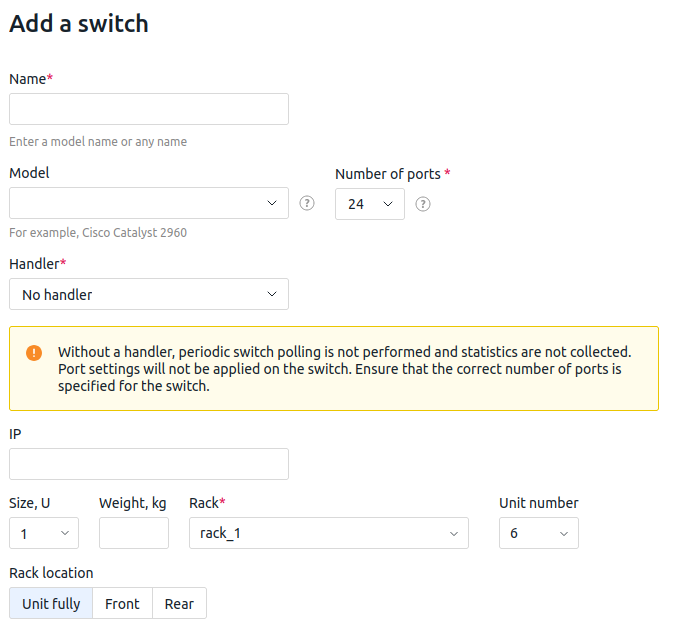
Features of a switch without a handler
A switch without a handler will operate with the following limitations:
- Periodic polling of the switch is not performed;
- Statistics on the switch ports are not collected;
- If you specify the number of switch ports when creating a switch without a handler, the ports will have the following parameters:
- Port name —
Port <port number>; - Speed —
Unknown; - Link —
Unknown; - Duplex —
Unknown; - Status —
No handler.
- Port name —
Editing the number of ports
You can change the number of ports for a switch without a handler when editing the switch:
- If you increase the number of ports, the platform will create new ports with similar parameters.
- If you decrease the number of ports, ports from the end of the list will be removed. If at least one of these ports is connected to another device, the operation will fail with an error, and the ports will not be deleted.
Changing the handler
Switching from "No handler" mode to a handler mode
You can change the handler from No handler to any other. In this case:
- The platform starts polling the switch.
- Based on the polling results, the switch ports are created.
- All created free ports for the switch without a handler will be deleted. Ports connected to equipment will remain until you free them and perform the switch polling again.
Switching from a handler to "No handler" mode
You can change the handler to No handler. In this case:
- If the Number of ports is not specified and there are no connections to the switch ports, all ports will be deleted. If at least one port is connected to equipment, the operation will fail with an error and the handler will not change. In this case, you need to free the ports or specify a sufficient number in the Number of ports parameter;
- If the Number of ports is specified, then:
- All port parameters except the Port name will change to "Unknown".
- If the current number of switch ports is less than the value specified in the Number of ports parameter, new ports will be generated.
- If the current number of switch ports is greater than the value specified in the Number of ports parameter, the excess switch ports will be deleted. If at least one such port is connected to equipment, the operation will fail with an error and the handler will not change.
Useful tips
Related topics: