 En
En
 Es
Es
The article contains the following terms:
Problem
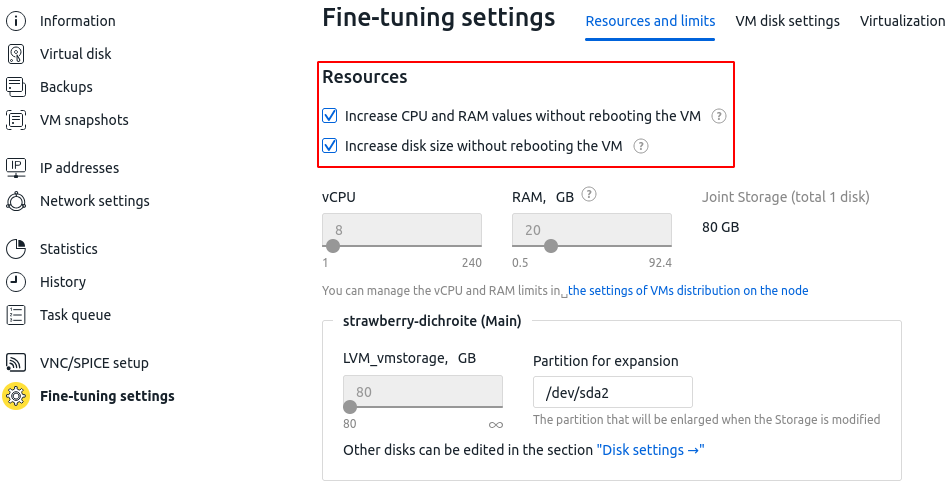
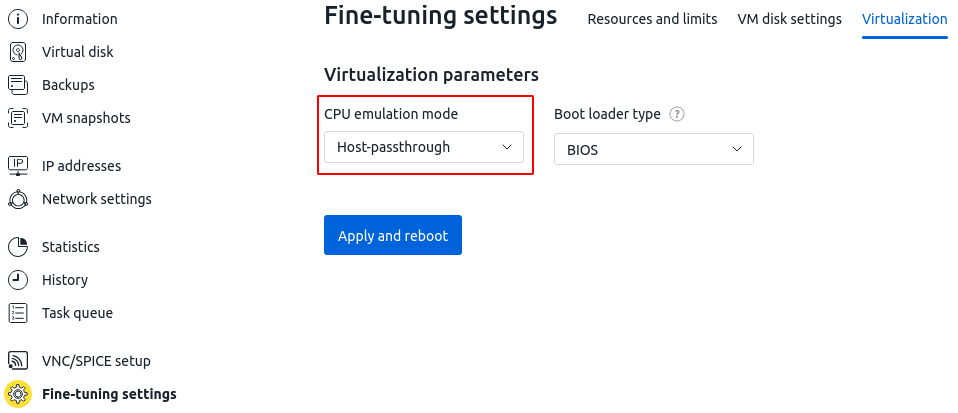
Enabling the combination of the following parameters in the Virtual machines → select a VM → menu  → Parameters → Fine-tuning settings section prevents the virtual machine from starting:
- dynamic resource changes without reboot on the Resources and limits Resources and limits tab;
- Host-passthrough CPU emulation mode on the Virtualization tab.
When attempting to start the VM, the following error occurs:
libvirt: QEMU Driver error : internal error: QEMU unexpectedly closed the monitor (vm='15_powder-hackmanite'): 2025-07-10T10:11:08.667969Z qemu-system-x86_64: -accel kvm: warning: Number of hotpluggable cpus requested (240) exceeds the recommended cpus supported by KVM (152)
Socket connected unix:/var/lib/libvirt/qemu/16-15_powder-hackmanite/monitor.sock,server=on
This error occurs on the guest OS side when using Windows. This OS has fundamental limitations in handling dynamic resource changes:
- lack of support for hot-adding CPUs or RAM at the Windows kernel level, unlike Linux systems where this functionality is implemented via ACPI and kernel modules;
- in most cases, a reboot is required to apply changes, especially when modifying processor topology or memory.
Solution
Disable dynamic resource changes:
- Navigate to Virtual machines → select the VM → menu → Parameters → Fine-tuning settings → Resources and limits tab.
- In the Resources section, disable the following options:
- Increase CPU and RAM values without rebooting the VM;
- Increase disk size without rebooting the VM.
Useful tips
Related topics: