 En
En
 Es
Es
Problem
When attempting to create a virtual machine (VM) with the NoOS option, or when trying to use a custom ISO image, the operation fails.
Diagnosis
To confirm the cause of the issue:
- Verify that errors occur when trying to create a VM without an OS or from a custom ISO image:
- In the web interface:
{"error":{"code":5111,"msg":"Repository check failed"} - In the
vm_writer.logfile:request GET 'localmetadata.json/' failed. error: 'Host not found (authoritative)'
- In the web interface:
- Check the contents of the
localrepository:
- Go to Templates → Repositories tab.
- Find the
localrepository in the list. - In the Content column, click the button showing the number of OS templates (e.g., “2 OS”)

If the list that opens contains a second template alongside the standard NoOS one (for example, one namedunknown), the cause of the issue is confirmed.
Solution
The problem occurs because a duplicate or incorrect copy of the NoOS template (e.g., named unknown) was accidentally added to the local repository. This prevents the creation of VMs without an OS or from a custom ISO.
To resolve the issue, disable the incorrect template in the local repository:
- Go to Templates → Repositories tab → select the
localrepository. - Click on the incorrect template (the one with a name different from NoOS, for example,
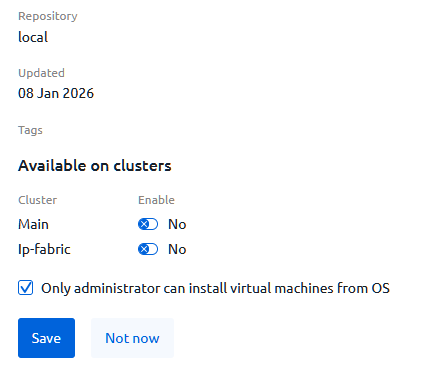
unknown). - In the Available on clusters section, disable the Enable option for all listed clusters. This will prevent the incorrect template from being used.
- Enable the Only administrator can install virtual machines from OS option.
Useful tips