 En
En
 Es
Es
The platform registers problems and errors that occur during operation. BILLmanager resolves them automatically when possible. You can:
- view errors;
- attempt to resolve problems automatically;
- configure which notifications to display;
- configure the notifications module.
Viewing errors and configuring rules
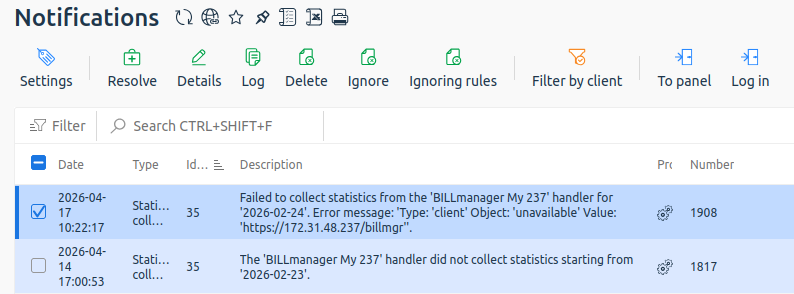
To view errors and configure rules, go to System status → Notifications → select a notification. You can:
- view the Log, which contains information about the problem occurrence;
- view Details — additional information about the error will be displayed;
- click Resolve to attempt to resolve the problem automatically. The button is available only if the error supports automatic resolution;
- Delete the notification;
- Ignore notifications by handler if they are related to statistics collection. The button is unavailable when selecting notifications of other types;
- configure rules. If you need to track statistics by handler again, click Ignore rules → select the notification → click Delete. The notification will be displayed again, but the error occurrence counter will be reset;
- set the Filter by client;
- go To panel with employee rights;
- Log in to the control panel with user rights.
Notifications module settings
To configure the notifications module:
- Go to System status → Notifications → click Settings.
- Specify:
- In the Basic block:
- Keep old notifications (days) — storage time for notifications. Specified in days.
- Keep resolved problems (days) — storage time for records about resolved problems. Specified in days.
- Show user notifications — enable the option to add user notifications to the administrator notifications list.
- In the Notification block:
- Send Email notifications — option for sending notifications via email. If the option is enabled, specify:
- SMTP server — address of the SMTP server for sending notifications.
- SMTP server port.
- Email for notifications — notification recipient email.
- Sent from — notification sender email.
- Notification message language.
- Send Email notifications — option for sending notifications via email. If the option is enabled, specify:
- In the Basic block:
- Click Ok to save the changes.
Reported issues BILLmanager
- Unable to collect statistics from the processing module for the date;
- The processing module did not collect statistics from the date;
- The exchange rate has not been loaded since the date;
- An error occurred during service billing;
- An error occurred on the processing module when opening the service (as a result, the processing module for the service was replaced with another one);
- An error occurred while executing a request to the processing module;
- An error occurred while checking the license for the integration module during the operation on the processing module;
- An error occurred while executing a request to the name server;
- An error occurred while executing a request to IPmanager;
- The IP address exists in the processing module, but not in the billing system;
- The IP address exists in the billing system, but not in the processing module;
- The control panel for communication with IPmanager specifies a user other than the user in BILLmanager;
- In IPmanager, the user is listed as having an occupied IP address, although it is not listed in BILLmanager. The address can be pinged.
- The main IP address of the service differs from the IP address of the platform license;
- An error occurred when changing the service tariff, and a setback to the previous tariff plan was made;
- An error occurred when switching the “operating system” add-on for the service.
- The service is in “Processing” status, but there are no tasks/current operations.
- The trial services available for order have expired for the tariff plan.
- The module download ended with an error.
Reported issues COREmanager
BILLmanager is developed based on COREmanager. Therefore, problems and events are also registered:
- Errors occurred while making a backup copy based on the backup plan;
- Non-critical errors occurred while making a backup copy based on the backup plan;
- Backup completed successfully;
- Errors occurred while restoring the backup copy;
- Non-critical errors occurred while restoring the backup copy;
- Backup restore has been completed successfully;
- The backup and recovery functions modified the behavior, that's why we have deleted the information about previous backups;
- The user has requested data export in CSV;
- The user has requested deletion of personal data;
- The user has requested obliteration or limitation of usage of personal data;
- Error executing a command via cron;
- Error managing the secondary DNS server;
- failed to delete the domain;
- failed to update the domain information;
- failed to create a domain;
- domain has invalid
serial. Perhaps, your DNS server processes domain update queries too slow;
- The plug-in failed or returned invalid XML;
- Authentication token has not been added;
- An error occurred while unassigning the IP address;
- Error allocating IP address. Reason;
- No available IP addresses in IPmanager;
- An error occurred in IPmanager while allocating the IP address;
- IPmanager returned an empty address;
- the IP address does not correspond to the selected version of IP addresses;
- you have insufficient permissions for allocating the selected IP address or it is already assigned;
- no available IP addresses of the specified type in the subnet;
- The operation was terminated. The cause of the error:
- executable file not found;
- script of the service not found;
- failed to locate the configuration file;
- failed to create the user database for;
- failed to locate a path to the database directory;
- failed to locate a path to the file;
- the application not found;
- an error occurred while creating the MySQL user;
- operating system not supported;
- software not supported;
- software not available;
- application name is not specified in the installer parameters;
- failed to complete the operation;
- failed to locate the path to domain zone directory;
- failed to change the owner;
- failed to change access privileges;
- failed to get information about the file or directory;
- failed to locate the socket file;
- failed to start the MySQL server with the
--skip-grant-tablesparameter; - failed to change the MySQL administrator password;
- failed to start the service;
- failed to connect to the server;
- the object is missing in the storage;
- configuration file has an invalid format ;
- an error occurred when registering the application;
- an error occurred when updating the application;
- an error occurred when deleting the application;
- no information about the current version of the application;
- fstab has an invalid format;
- failed to define the mount point for the directory ;
- an error occurred when writing the parameter;
- failed to start (restart) the application;
- path to is not specified in the configuration file;
- failed to define name or group of web-server's internal users;
- the control panel requires software product;
- the software product cannot be deleted as it will delete depended packages;
- A fatal error occurred in the module while installing the software. The installation process is not completed;
- A fatal error occurred in the module while configuring the software. The installation process is not completed;
- A fatal error occurred in the module while completing configuration. For more details see the installer log;
- A fatal error occurred in the module when deleting the software. The process is not completed;
- Executable file is missing;
- Install the cron package to be able to use the scheduler;
- A critical error occurred during OS template synchronization;
- An error occurred when signing the DNSSEC domain. Recent changes were canceled. For more details see zonesigner.log;
- An error occurred when re-signing the DNSSEC domain. Recent changes were canceled. For more details see zonesigner.log.
Useful tips
Related articles: