 En
En
 Es
Es
This section provides information on billing configurations in BILLmanager required for:
- generating accounting documents and invoices;
- payment processing.
To start accepting payments from clients:
- Create a company.
- Configure taxes.
- Connect a payment method.
- Configure payer settings.
- Prepare document templates.
Company and tax configuration
Company
Company is the entity to which all accounting documents are linked. Companies conduct business activity and provide services to customers. In BILLmanager, you can create multiple companies to:
- simplify interactions with different clients. For example, if a provider works with clients from different countries and requires different document templates;
- streamline accounting operations.
Each company can have its own contract templates and work with different providers in your BILLmanager.
You can manage company settings or create a new one in the section Provider → Companies. For more information on creation and configuration, see Company.
Taxation
In BILLmanager, you can set a tax on the service cost and establish taxation rules. Each rule defines:
- companies for which the rule applies;
- clients of which countries and regions are subject to taxation;
- the tax percentage rate;
- the tax validity period;
- the product types subject to taxation.
Configure taxation policies to determine how the tax is reflected in the service cost and displayed to the client. Policies are applied at the provider or client group level and affect invoice and act generation. You can select options:
- Do not include into price — enable if the tax should be charged on top of the base service cost; in this case, the final amount to pay is increased by the tax amount, and the tax is displayed as a separate line in the invoice;
- Show tax when a client adds funds — enable if the tax should be applied to advance payments; in this case, the tax amount is displayed in the invoice form when the client adds funds to the balance.
To create a new rule, go to the section Provider → Providers → select the provider → click Tax → click Add.
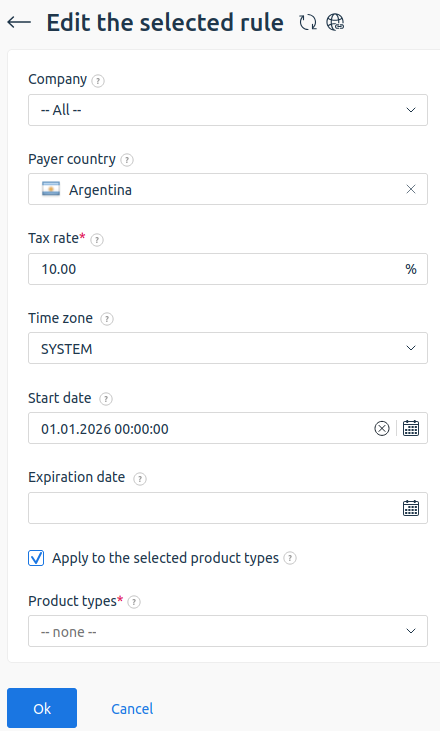
For more information on working with tax configuration, see the article Taxes.
VAT
VAT (Value Added Tax) is a value added tax in the European Union (EU).
VAT is charged on both physical and digital goods and services. The EU Directive dated January 1, 2015 contains detailed information on the regulation of VAT for digital products.
Read more in:
Configuring payment method
To process payments, such as accepting and refunding payments, the billing platform integrates with third-party payment services. Registration on the payment system side may be required for integration with payment modules.
To connect payment methods, go to the section Provider → Payment methods → click Add:
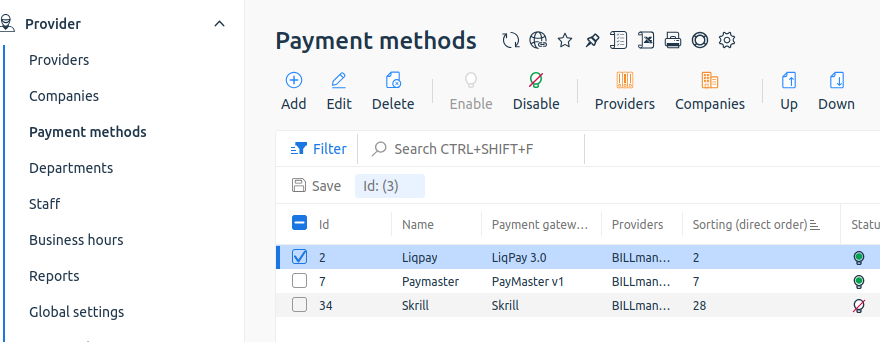
For more information, see Integration with payment gateways and articles in the section Payment gateways.
Configuring interaction with clients
Contracts
A contract in the billing platform is an electronic document generated based on an EJS template. Contracts are generated by the platform automatically or manually depending on the type.
Automatically created:
- offer contract;
- standard framework contract;
- standard contract for each purchase.
The system generates the following contracts:
- when a client orders a service with a suitable product type;
- when adding a payer, if the service was ordered for a trial period without creating a payer;
- after creating a new contract template, if the client has active services that fall under its terms.
Manually created:
- non-standard contract — a contract that the client has modified;
- any type of contract through the platform interface, if individual configuration or a specific signing date is required.
To create a contract manually, go to the section Clients → Contracts → click Add, select a template and specify the payer. For more information, see the Contracts article.
Document templates
BILLmanager generates electronic documents for each financial transaction. The document contains information about the transaction and company details. The layout and structure are defined in the template.
The platform comes with a set of ready-made templates for main financial documents (invoices, acts, contracts), which allows you to start working immediately after installation. All templates are available in the section Settings → Document templates.
Since templates determine the final document formatting, you can edit them independently according to your company's requirements or legislation.
To manage document templates, go to the section Settings → Document templates.
For detailed instructions on changing and creating templates, see the article Document templates.
Working with payers
A payer is a separate entity in BILLmanager for performing financial operations. The payer generates invoices, receives acts and financial notifications, and also makes payments. For one client account, you can create multiple payers — for example, to separate payments from an individual and a legal entity.
Payer information includes postal and email address, phone, contact person name, and other details used when generating financial documents.
Specify main parameters for working with clients in the client area in sections:
- Provider → Global settings → Payers block;
- Provider → Financial settings → Payers block.
For more information, see the articles: